Airline-grade A320, A321 and 737-800 performance. VATSIM-native briefing.
Import your SimBrief OFP and SkyNexus builds the full briefing: FCOM-grounded takeoff and landing performance for the A320, A321 and 737-800, a predicted runway-vacate exit, your SID, STAR and approach drawn on the map, route-aware weather, charts, and live VATSIM and IVAO ATC matched to your routing by airspace geometry. The depth the in-sim EFB can’t reach, free in any browser alongside MSFS 2024, X-Plane or P3D. No install.
Weather on your route at the time you fly it, take-off and landing numbers for your aircraft, and the QRH with diversion options for your weight. All from your SimBrief flight, free, in the browser.
Two things no in-sim EFB and no free competitor ship together: real FCOM-grounded A320 dispatch math and an eWAS-style route forecast. Then every source that matters (weather, NOTAMs, division notes, airport data and live VATSIM & IVAO ATC) reconciled into a flight-ready briefing. You read decisions, not raw data.
New
Your SID, STAR and approach, drawn on the map
SID
STAR
ILS / RNP
Altitude & speed limits
Every AIRAC
The SID you filed, the STAR into your destination and the approach at the end, drawn on the enroute map with the altitude and speed limits at each fix. Pick another one right on the map when ATC changes the plan. More than 3,400 airports in 18 countries, read from each country's official AIP and refreshed every AIRAC cycle.
Zoom in on an airport and the ground diagram is on the same map: stand numbers at the stop position with their lead-in lines, holding positions with their signs, red stop bars, approach lights, PAPIs and windsocks. More than 3,000 airports, with the big hubs checked by hand against aerial photos.
Takeoff and landing performance from your SimBrief OFP
V-speeds
Flex temp
OPTIMUM flap
Wet / contam
CG → trim
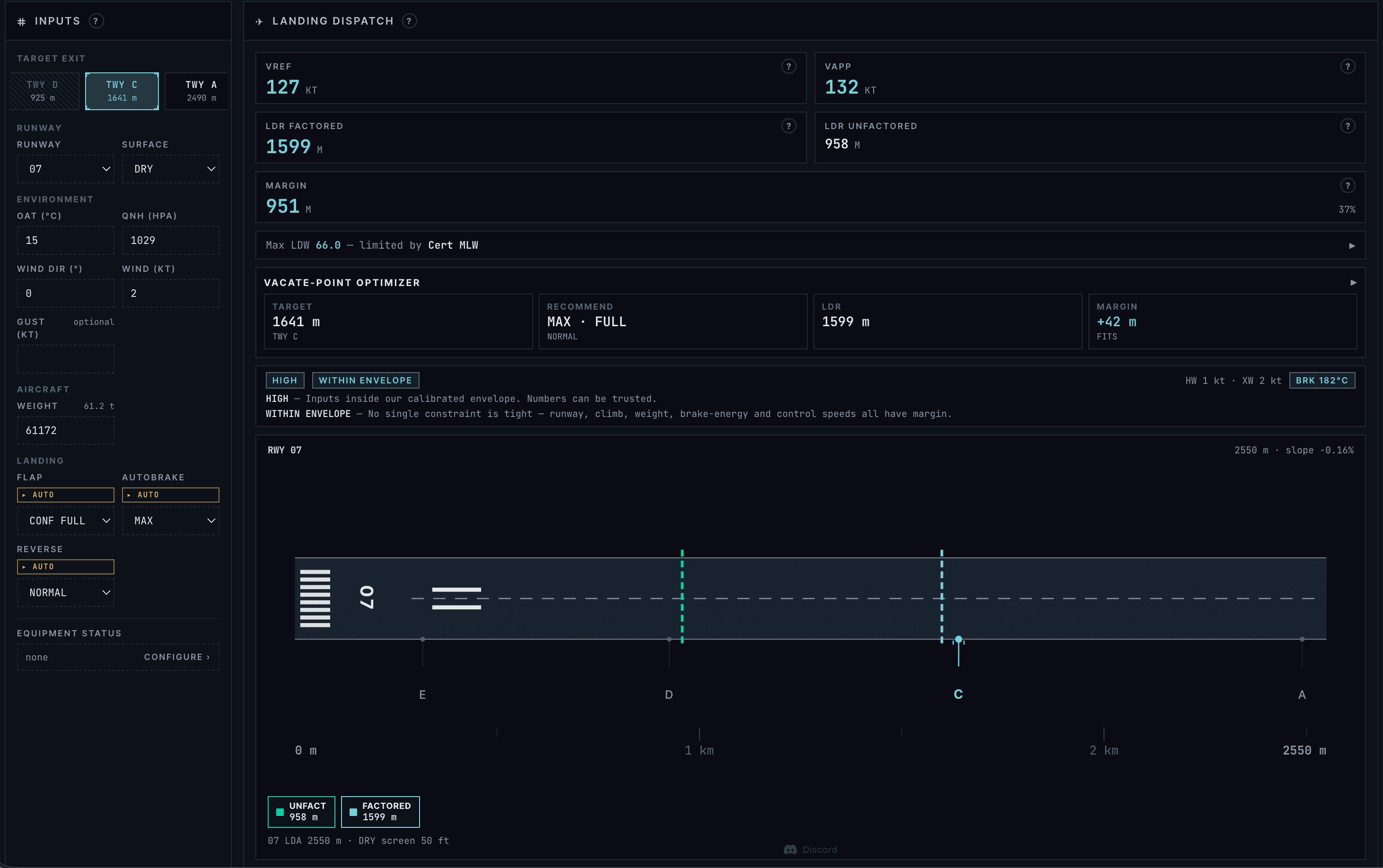
Real dispatch math for the A320, A320neo, A321, A321neo and 737-800 (indicative on the 777-300ER and A380-800), integrated with your SimBrief OFP and the live METAR. V-speeds, three runway distances, flex temp, OPTIMUM flap, autobrake, reverse, wet and contaminated models, and on the A320 and 737-800 MEL items and a CG → trim derivation. Every number is explained by a help modal and every step is auditable from public Airbus and Boeing material and the open-source OpenAP library. Free, where this normally sits behind a paywall.
The first eWAS-style weather forecast for flight sim
Turbulence
Icing
Jet stream
Fronts
T+36h hourly
Turbulence, icing, jet streams and fronts overlaid on the enroute map at your selected flight level, plus an interactive vertical cross-section along your route. NOAA GFS, scrubbable hour-by-hour to T+36h. Lightning, storm cells and satellite imagery on the same map. No SimBrief Premium tier required.
Flying with someone next to you or on the other side of the world? Pair two devices with a QR code, or read out the short code, and you both work from the same OFP. Whatever either of you draws on the enroute map shows up on the other device right away, and a runway change by either pilot updates the plan for both. Zoom, tab and layers stay your own. Find it under the gear menu in the top right.
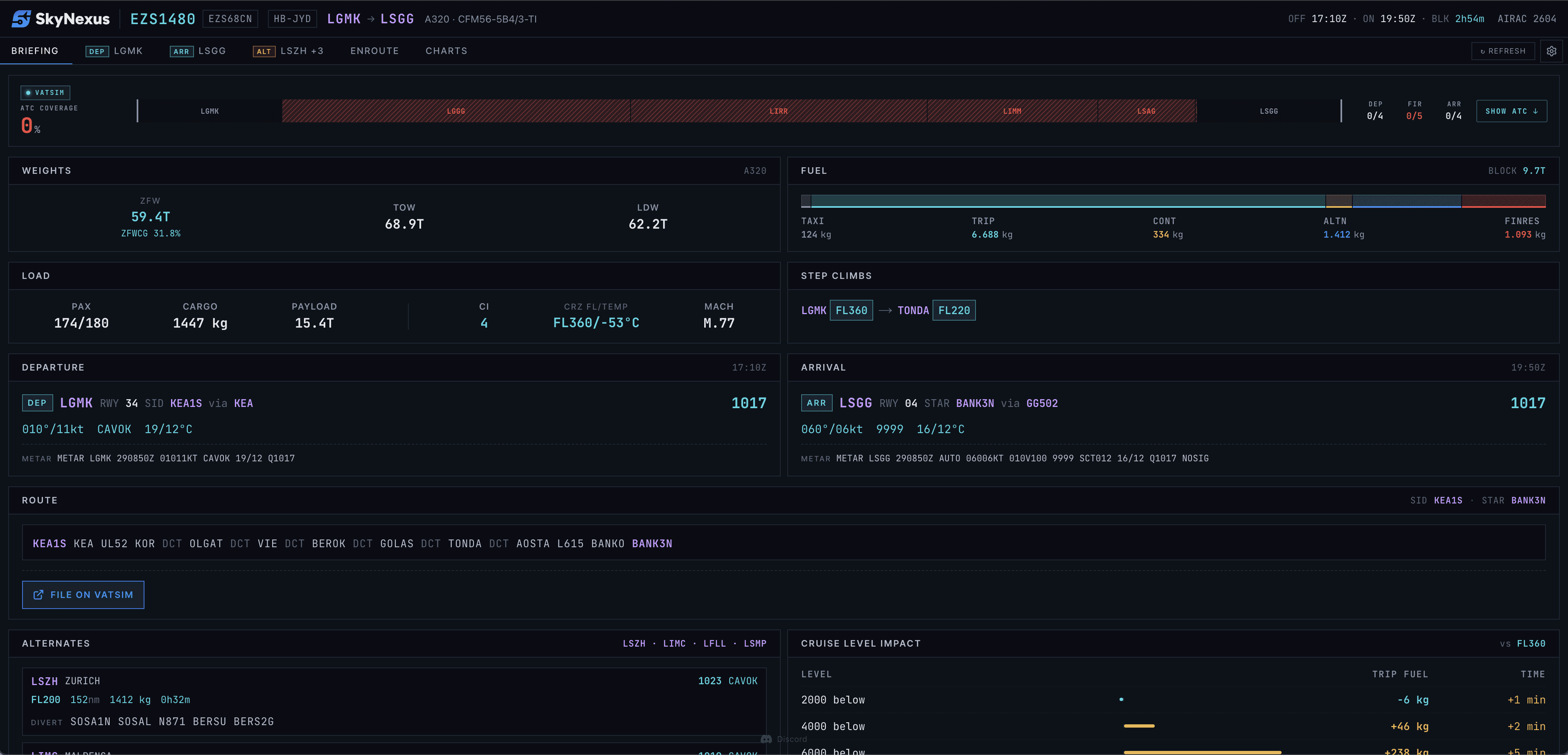
Import your SimBrief OFP and we reconcile weights, fuel, routing, cruise level and alternates into a single briefing. Alternates get their own full tab. No manual copy-paste from the PDF.
Airport Info, Consolidated
Runways, NADPs, engine-out SIDs, ATIS letters, taxi briefings, airport ops notes and 100+ VATSIM division briefings (UK, Germany, Scandinavia, Austria, Poland, Spain, Italy, Belux, Portugal, Netherlands) formatted into one readable page per field.
Charts, Flight-Aware
Link ChartFox (free) and the aerodrome, SID, STAR and approach plates for your filed runways and procedures are picked out, pinned and ready in an inline PDF viewer with zoom, pan, rotation and pinch.
Weather, Already Interpreted
METAR and TAF parsed into wind components, crosswind, visibility and ceiling per runway. A live enroute weather map threads wind barbs, conditions overlay and strong-winds highlighting along your route.
Threats, Auto-Assessed
We cross-check weather, NOTAMs and division notes against your runway and flight phase, then surface the critical items as a threat banner rather than buried three scrolls down.
Live VATSIM & IVAO, Matched by Geometry
VATSIM-native, not a network bolt-on. The coverage strip matches controllers, ATIS and FIR sectors to your actual routing by airspace geometry (not a nearest-airport guess) on both VATSIM and IVAO. Expand it for every station's frequency and handoff waypoint, and get a global popover the moment your COM1 is tuned to the wrong station for your position.
Why SkyNexus
“Free, browser-based, VATSIM-aware” isn’t the differentiator anymore
Half a dozen sim EFBs now claim some version of that. So here is the line that actually matters: SkyNexus is built around operational depth that no in-sim EFB and no free competitor ships: the things below are genuinely hard to fake.
Real dispatch math, not a lookup table
FCOM-grounded A320 takeoff and landing performance (V-speeds, three runway distances, flex, OPTIMUM flap, wet and contaminated models, MEL items, CG → trim) derived from public Airbus material and OpenAP, with every number auditable in a help modal.
The in-sim perf is a toy; paid tools paywall the tables.
VATSIM-native, not a network bolt-on
Controllers, ATIS and FIR sectors matched to your actual routing by airspace geometry (on both VATSIM and IVAO), plus a global alert the moment your COM1 is wrong for your position.
Others list the nearest controllers and call it VATSIM support.
It tells you which exit you'll make
A predicted runway-vacate exit from your SimBrief landing weight, the live METAR wind and the runway geometry. It sits on the briefing tab, before you start the approach brief.
No in-sim EFB and no competitor ships this today.
Zero install, independent, genuinely free
One URL in any browser, alongside MSFS 2024, X-Plane or P3D. No community folder, no app-store version mismatch, no Navigraph subscription on top. Indie and EU-built. Not owned by private equity.
No download, no panel conflicts, no recurring bill.
A clean, dark MFD-inspired interface designed for fast scanning and instant access to the data that matters.
Briefing
Briefing Panel
Complete flight overview with weights, fuel, timing, departure and arrival weather, routing, alternates, and cruise level impact. A live VATSIM coverage strip sits at the top so you see the ATC picture for your route, controller by controller, without leaving the page.
Airport
Airport Information
Detailed airport view with wind compass, METAR/TAF, NADP, engine-out SIDs, runway data, ATIS, and crew briefing with threat assessment.
Runway exit
Runway Exit Prediction
A predicted runway-vacate exit for every runway at your destination and alternate, from your SimBrief landing weight, the live METAR wind and the runway geometry, with three deceleration profiles. You brief the taxi route before the flare, not after. No in-sim EFB and no competitor ships this.
Enroute
Enroute View
Your filed route on an interactive globe with the full operational picture: live weather (METARs, SIGMETs, winds, radar), VATSIM traffic and ATC sectors, navaids and airways, all toggleable, with data thinning automatically as you zoom from continental cruise to terminal arrival.
Charts
Charts
Browse approach, departure and airport charts for every airport on your flight with ChartFox. The primary plate for your SID, STAR and runway is picked out for you, with alternatives one click away and a pinboard to jump between favourites.
Performance
Performance Calculator
A320 performance calculator for Flight Simulator. V-speeds, three runway distances, flex temp, OPTIMUM flap, autobrake, reverse, MEL items and CG → trim. Auto-filled from your OFP and live METAR, with a help modal on every number. Methodology auditable from public Airbus material and the open-source OpenAP library.
SkyNexus EFB is a web-based Electronic Flight Bag for flight simulation. It integrates with SimBrief to provide a complete operational briefing: flight plans, weather, NOTAMs, airport information, FCOM-grounded performance for the A320, A320neo, A321, A321neo and 737-800, indicative performance for the 777-300ER and A380-800, and live VATSIM and IVAO ATC matched to your route.
Is it free to use?
Yes, SkyNexus EFB is completely free. Create an account and start using it right away.
Do I need a SimBrief account?
A SimBrief account is recommended to import your own flight plans, but you can also try the EFB with a built-in demo flight to explore the features without connecting SimBrief.
Which simulators are supported?
SkyNexus EFB works with any flight simulator that uses SimBrief for flight planning, including MSFS, X-Plane, and Prepar3D. Since it's a web-based tool, it runs alongside your simulator in a browser.
Does it work with VATSIM and IVAO?
Both. A live coverage strip on the briefing matches controllers, ATIS and FIR sectors to your actual routing by airspace geometry (not a nearest-airport guess) on VATSIM and IVAO alike, with frequencies and handoff waypoints. A global alert also fires when your COM1 is tuned to the wrong station for your current position.
Does SkyNexus show SIDs, STARs and approaches?
Yes. The SID you filed, the STAR and the approach are drawn on the enroute map with the altitude and speed limits at each fix, for more than 3,400 airports in 18 countries, read from each country's official AIP and refreshed every AIRAC cycle. Zoom in on an airport for its ground diagram, with the stands, holding positions and stop bars.
Can two pilots share one flight?
Yes. Open the gear menu in the top right and pick Shared cockpit. The other pilot scans your QR code, or types in the short code when they are not next to you. You then both work from the same OFP and see each other's drawings on the enroute map as they are made, while each of you keeps your own view. A runway change by either pilot updates the plan for both. If you both load the same flight, SkyNexus suggests pairing by itself.
How is this different from the built-in MSFS 2024 EFB?
The in-sim EFB is built for casual flying and lives inside the cockpit. SkyNexus runs in a browser on a second screen, tablet or phone, and adds the operational depth the in-sim tablet doesn't reach: FCOM-grounded takeoff and landing performance for the A320 family and the 737-800, a predicted runway-vacate exit, an eWAS-style route weather forecast, geometry-matched VATSIM & IVAO coverage, and threats auto-assessed into one banner. There's a full side-by-side on our comparison page.
How accurate is the A320 performance calculator?
It's derived from public Airbus material and the open-source OpenAP library (not scraped FCOM tables), so every input and every step is auditable, and each number has a help modal that explains its derivation. It covers V-speeds, three runway distances, flex temp, OPTIMUM flap, autobrake and reverse, MEL items, wet and contaminated runway models, and a CG → trim derivation. It's built for simulation and education, not for certifying real flights.
How do I get started?
Create a free account at app.skynexus.nl, enter your SimBrief Pilot ID, and load your first flight plan. The entire process takes less than a minute.
Ready for departure?
Create your free account and load your first flight plan in under a minute.