Why I stopped using the MSFS 2024 in-sim EFB for VATSIM flights
The in-sim EFB is built for casual flying. For VATSIM, the right move is to stop fighting it and run your briefing somewhere else.
I gave up on the MSFS 2024 in-sim EFB three flights into a VATSIM callout. Not because of one big flaw, but because every small one kept landing on me at the same moment: planning routes that ATC would never accept, refusing to push the route to the avionics, hiding the H125 side windows during taxi, weight and fuel UI that took twice as long as it did in 2020. The MSFS forums have a long thread literally titled “Does anyone else despise the EFB system?” with every one of those complaints repeated by other pilots. It is not just you.
I am the developer of SkyNexus EFB, so this post comes with a clear bias and you should read it that way. The point is not that everyone needs another EFB. The point is that fighting the in-sim EFB is the wrong problem to solve, and once you stop trying, VATSIM flying gets calmer almost immediately.
What the in-sim EFB is actually for
Asobo built the in-sim EFB as a default tool for the median MSFS user: someone who fires up a Cessna, wants a moving map, a basic flight plan and a tablet aesthetic. Inside that scope it does fine. The problems start when serious VATSIM pilots try to use it as a real EFB:
- Routing. The route planner generates plans by stitching together waypoints that look reasonable in isolation but break in airspace nobody actually files through. ATC will tell you to refile.
- Avionics integration. The send-to-avionics button silently fails for most third-party aircraft. Even when it works, you have to refly the cleared route through your FMC anyway.
- Weight and fuel. The interaction model regressed from MSFS 2020. Loading a SimBrief OFP into the tablet is more clicks, less accurate, and the numbers do not always sync to the aircraft.
- Cockpit ergonomics. On single-screen setups the tablet covers the side windows on smaller GA aircraft. There is no quick toggle to hide it.
None of this is going away in a patch. The architectural decision to bake the EFB into the cockpit means every fix has to fight every other Asobo and third-party constraint. Sim Update 5 helped at the edges. It did not help with any of the four bullets above.
The reframe: stop fighting it
The cleanest move is to stop expecting the in-sim EFB to be the EFB. In a real cockpit, the iPad is a separate device. It does not talk to the FMC. It is a briefing tool, a chart viewer, a place to read the OFP and the NOTAMs. The pilot programs the FMC by hand from the OFP. The EFB is adjacent, not integrated.
Sim that. Run a real EFB on a second monitor, a tablet, or your phone. Treat the in-sim tablet as scenery. Program the FMC the way you would program a real one, by hand from the printed OFP. Suddenly all four bullets stop being your problem.
What you actually need from a VATSIM EFB
Once briefing moves out of the cockpit, the requirements clarify. For VATSIM specifically you need:
- SimBrief import. Your OFP is the source of truth for weights, fuel, route and alternates. The EFB should pull it once and render it for you.
- Weather already interpreted. Raw METAR is fine for dispatchers. In flight you want crosswind components per runway, ceilings, visibility, and a wind picture along the route.
- NOTAMs and airport ops notes. Filtered to your airports and your runways, not a 40-page dump.
- Charts. SID, STAR, approach and airport diagram for your filed runways, not a full Jepp library.
- Live VATSIM coverage. Which controllers cover which parts of your route, where the handoffs are, and what the current ATIS says. Not a global controller list. Yours.
- Threats surfaced, not buried. If a runway is closed, the wind is out of limits, or there is a TFR on the route, you should see it before you scroll.
That is roughly the requirements doc behind SkyNexus. Free, browser based, runs in any tab on any device, no install. Import your OFP, you get all of the above, with a live VATSIM strip that matches controllers to your route by airspace geometry rather than nearest airport.
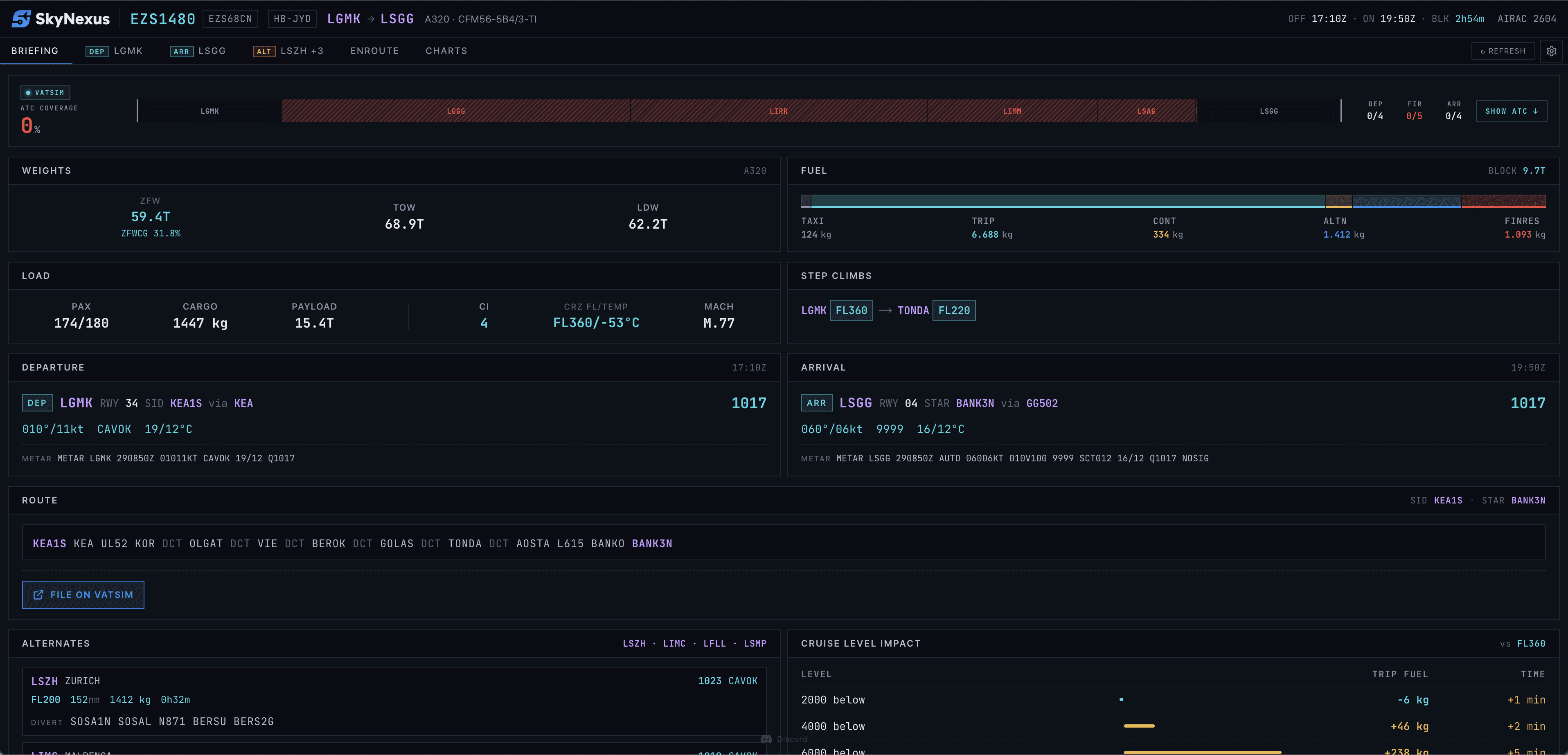
What changes when you stop fighting
The biggest change is not the feature list. It is the mental model. Once the in-sim tablet is no longer something you depend on, the bugs stop being personal. The route planner being weird is not your problem because you are not using it. The avionics button doing nothing is not your problem because you program the FMC by hand. The tablet covering your H125 window is not your problem because you have collapsed it.
That mental shift takes about one flight to settle in. After that, the VATSIM half of the hobby gets quieter, the cockpit gets less cluttered, and your briefing gets faster. The in-sim EFB is still there. You just do not need it.
Try SkyNexus EFB
Free, browser-based, runs alongside MSFS 2024, X-Plane or P3D. Import your SimBrief OFP and get the full briefing in under a minute.
Get Started Free