See the weather where you'll be,
when you'll be there.
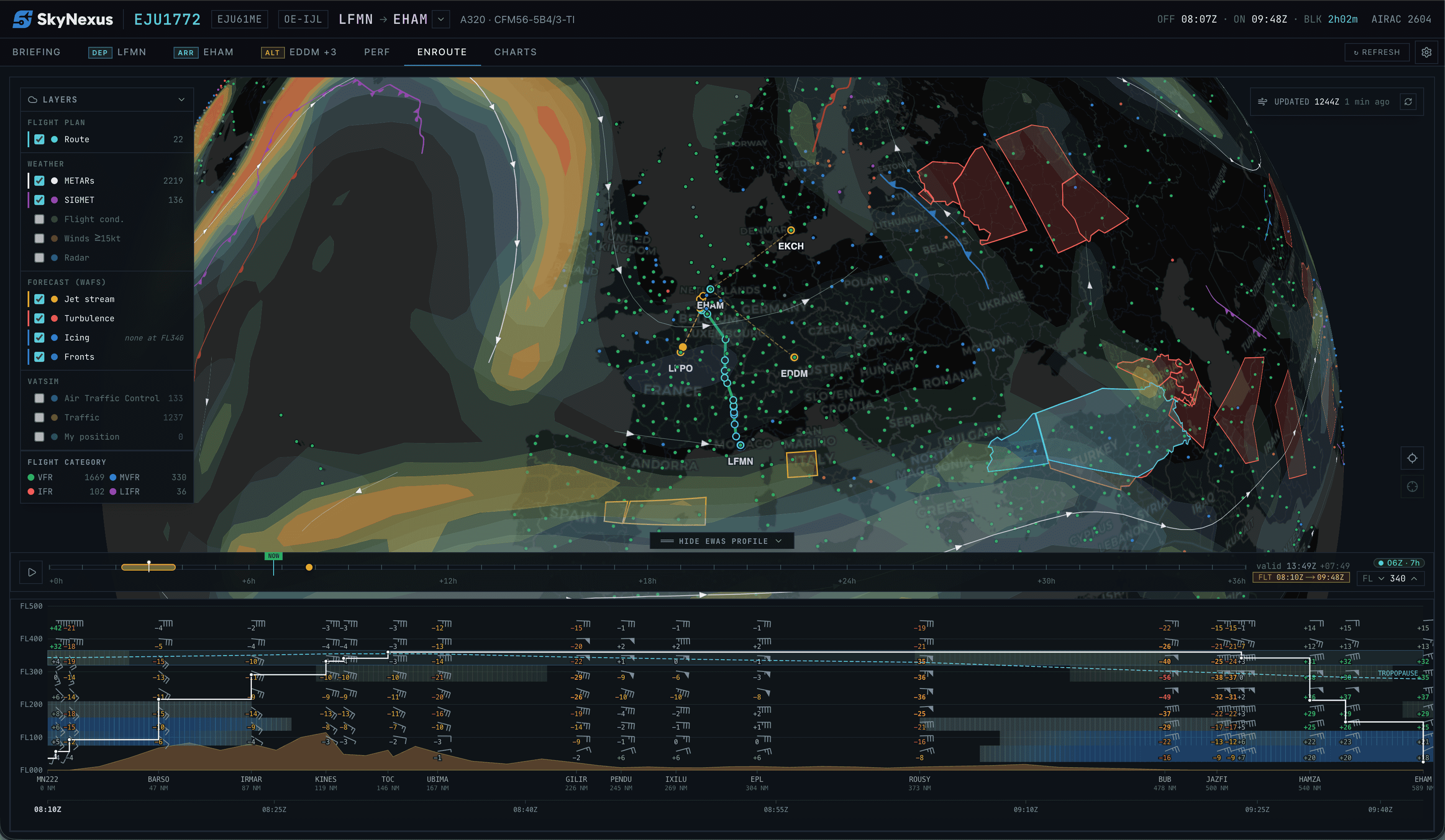
SkyNexus brings an eWAS-style weather forecast to flight simulator pilots for the first time. Turbulence, icing, jet streams and fronts overlay your route on the map at your selected flight level, with an interactive vertical cross-section from departure to arrival. Works in MSFS 2024, X-Plane, P3D and on VATSIM. Free, browser-based, no install.
Why flight-sim weather planning was broken until now
Real airline crews use eWAS Pilot to see hazards along their route at the exact moment they'll fly through them. Nobody had built that for flight simulator. So we did.
Static PDF, single snapshot, global resolution. Useful, but if you climb 4000 ft or fly an hour later, you're reading the wrong chart.
Brilliant for SIDs, STARs and approach plates. But not a weather product — they don't show you where the jet is today.
Current METARs and TAFs only. No forecast layer, no enroute hazards, no route correlation.
Vertical weather profile along your flight-sim route
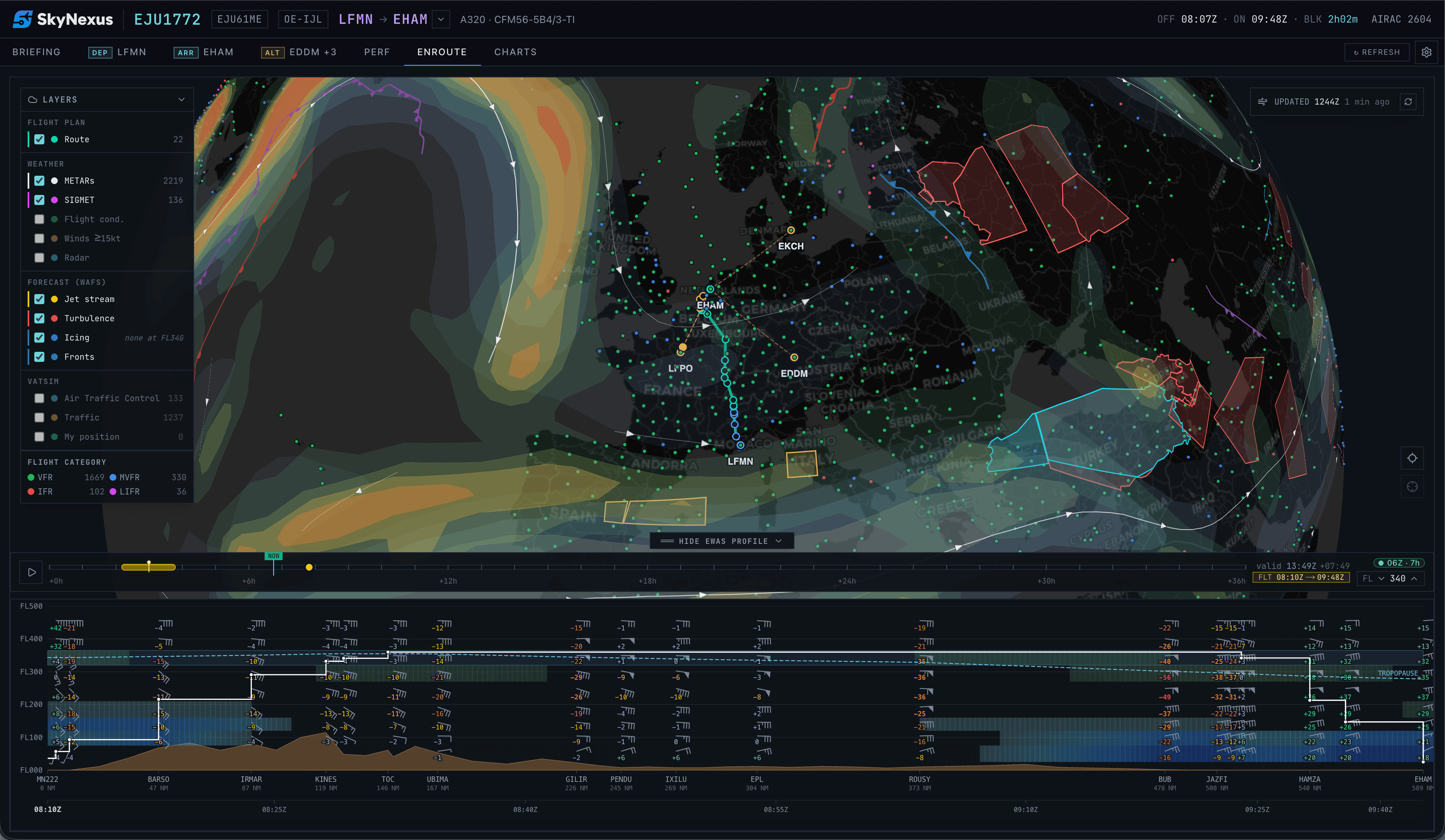
Distance on the X-axis, flight level on the Y, your planned profile drawn on top. Wind barbs and temperatures at every cell. Turbulence and icing shaded in the same palette as the map. Tropopause and terrain in plain sight.

What the SkyNexus weather forecast does
Hazards overlaid on the map
Turbulence (Ellrod TI), icing severity, jet stream extent and surface fronts paint directly on the enroute chart at the selected flight level. Toggle each layer independently. The flight band on the slider shows exactly which forecast steps your departure and arrival straddle.
Vertical cross-section along the route
Distance × flight-level grid from departure to arrival, every navlog waypoint a column, every FL a row. Wind barbs, tail-wind component, temperature, turbulence and icing shading, terrain silhouette and the tropopause line. Your planned altitude profile traces over the top.
Hover-linked to the map
Move the cursor along the profile, the map highlights the corresponding waypoint with a yellow ring and clock-time pill. Drag the time slider, the map updates and the profile column under the cursor stays anchored. Two views, one mental model.
Time slider out to T+36h, hourly
Scrub the entire forecast horizon at one-hour resolution. The slider shows the exact moment your aircraft will be at any waypoint, and the map's WAFS layers snap to the nearest data point.
Stays in sync with your SimBrief OFP
Imports your route, ETAs and altitudes automatically. Stale OFP? The sampler forward-projects yesterday's plan to today's cycle so you can still see what the weather would do if you flew it now.
Free, browser-based, no install
Same NOAA GFS data the real eWAS pulls from. Updated every 6 hours by SkyNexus's worker, served at zero cost to you. Runs in any browser alongside MSFS 2024, X-Plane or P3D.
How SkyNexus builds the eWAS-style forecast from NOAA GFS
The same data and the same hazard derivations operational meteorology runs. No invented values, no AI hallucinations.
- 01
Ingest GFS at every cycle
Every six hours (00, 06, 12, 18 UTC) the worker pulls the latest NOAA GFS 0.25° subset for the fields aviation cares about: U/V winds, temperature and humidity at pressure levels, plus CAPE and vertical velocity for icing classification.
- 02
Convert to flight levels
Pressure-level fields are interpolated to ISA-standard flight levels (FL050 through FL450 at the nine slabs the EFB needs) so a pilot can read "wind at FL340" directly without doing the pressure-altitude math.
- 03
Derive the aviation hazards
Ellrod turbulence index (TI1/TI2) from wind shear and deformation. CIP-style icing severity from temperature, RH and vertical motion. Hewson thermal front parameter on Bolton-1980 equivalent potential temperature for fronts. Jet stream extent from upper-level winds. Same algorithms operational meteorology uses.
- 04
Polygonise and ship
Hazard fields are contoured into MultiPolygon isobands at tiered thresholds, smoothed, then stored as compact GeoJSON in Supabase Postgres. The EFB streams just the FL you're looking at and renders with MapLibre.
- 05
Sample along your route
When you open the vertical profile, the route sampler bilinearly interpolates the gridded fields at every navlog waypoint × flight level × ETA. The grid you see is your actual planned route, not a generic strip across the map.
SkyNexus vs SimBrief, Navigraph and the real eWAS Pilot
Other tools cover slices of this. SkyNexus is the only one that puts the route-aware forecast in your sim, free.
| Capability | SkyNexus | SimBrief | Navigraph | Real eWAS |
|---|---|---|---|---|
| Hazard overlay on map | Live, per-FL, scrubbable | Static SIGWX PDF | Not available | Live, per-FL |
| Vertical cross-section along route | Interactive, hover-linked | Not available | Not available | Interactive |
| Time slider through forecast | T+0 to T+36h hourly | Single snapshot | Not available | Through validity |
| Tail-wind component per fix | Shown on hover | Calculated in OFP | Not available | Shown on hover |
| Data source | NOAA GFS, derived | NOAA GFS, derived | Not applicable | WAFS (official) |
| Price | Free | Free | From €10/mo | Enterprise license |
Compared as of May 2026. Real eWAS Pilot is Thales' enterprise weather awareness product for commercial airline crews and is not licensed for flight sim use. SkyNexus is not affiliated with Thales or any of the products above.
Flight-sim weather forecast FAQ
+What is eWAS and why does it matter for flight sim?
eWAS Pilot is the electronic weather awareness system real airline crews use to see hazardous weather along their route at the exact time they'll be there. Until now flight sim pilots got either a static SIGWX PDF from SimBrief or had to inspect Navigraph charts manually. SkyNexus is the first sim-aimed EFB that builds the same kind of route-aware, time-aware visualisation, with the actual forecast for the moment your aircraft will fly through it.
+Where does the weather data come from?
NOAA's Global Forecast System (GFS), the same public-domain dataset operational forecasters and the real eWAS pull from. SkyNexus ingests the latest cycle every six hours, derives aviation-shaped products (Ellrod turbulence index, CIP-style icing severity, Hewson thermal-front analysis, jet stream extent) on a Mac mini behind a Cloudflare Tunnel, and writes the simplified polygons + grid blobs to Supabase. The EFB reads from there at sub-second latency.
+How is this different from the SIGWX chart in my SimBrief briefing?
Your SimBrief SIGWX is a single static PDF snapshot of a coarse-resolution global chart. SkyNexus gives you the same underlying GFS data but rendered live on your enroute map, filtered to your flight level, scrubbable in time, and cross-sectioned along your actual navlog so you see what each waypoint will look like at the moment you're over it.
+Does it work for MSFS 2024, X-Plane and P3D?
Yes. SkyNexus runs in a browser tab; it doesn't care which sim you fly. Import your SimBrief OFP, open the enroute tab, the forecast panel is at the bottom of the map.
+How accurate is the GFS-derived turbulence/icing vs real WAFS?
Honest answer: it's the Ellrod index for turbulence and a CIP-style temperature-plus-humidity classifier for icing, both well-established proxies that operational meteorology uses. Not identical to WAFS EDR/SLD but the same shape and the same broad areas of concern. For a flight sim briefing that helps you avoid the worst patches, route around the jet for a tailwind, or plan an altitude with less turb, it's plenty.
+Is it really free?
Yes. SkyNexus is free and the weather forecast is part of the core product. No tiers, no upsell. The hosting cost is real (Mac mini at home, Supabase free tier, NOMADS bandwidth) but well within what one developer can absorb.
Fly through the weather you can see.
SkyNexus is free, in any browser, alongside any sim. Pilot to pilot, no install, no upsell.
Open SkyNexus