Predicting your runway exit before you land
How SkyNexus turns your SimBrief weight, the live METAR, and runway geometry into a recommended vacate exit before you even start the approach brief.
On a VATSIM arrival into a busy field you have one job in the last thirty seconds: vacate cleanly. The wrong runway exit costs you a re-clearance, costs the next arrival a go-around, and costs ground control half a minute of replanning. Real airline crews know which exit they will take before short final. SkyNexus now predicts the same thing for you, on the briefing tab, before you push back.
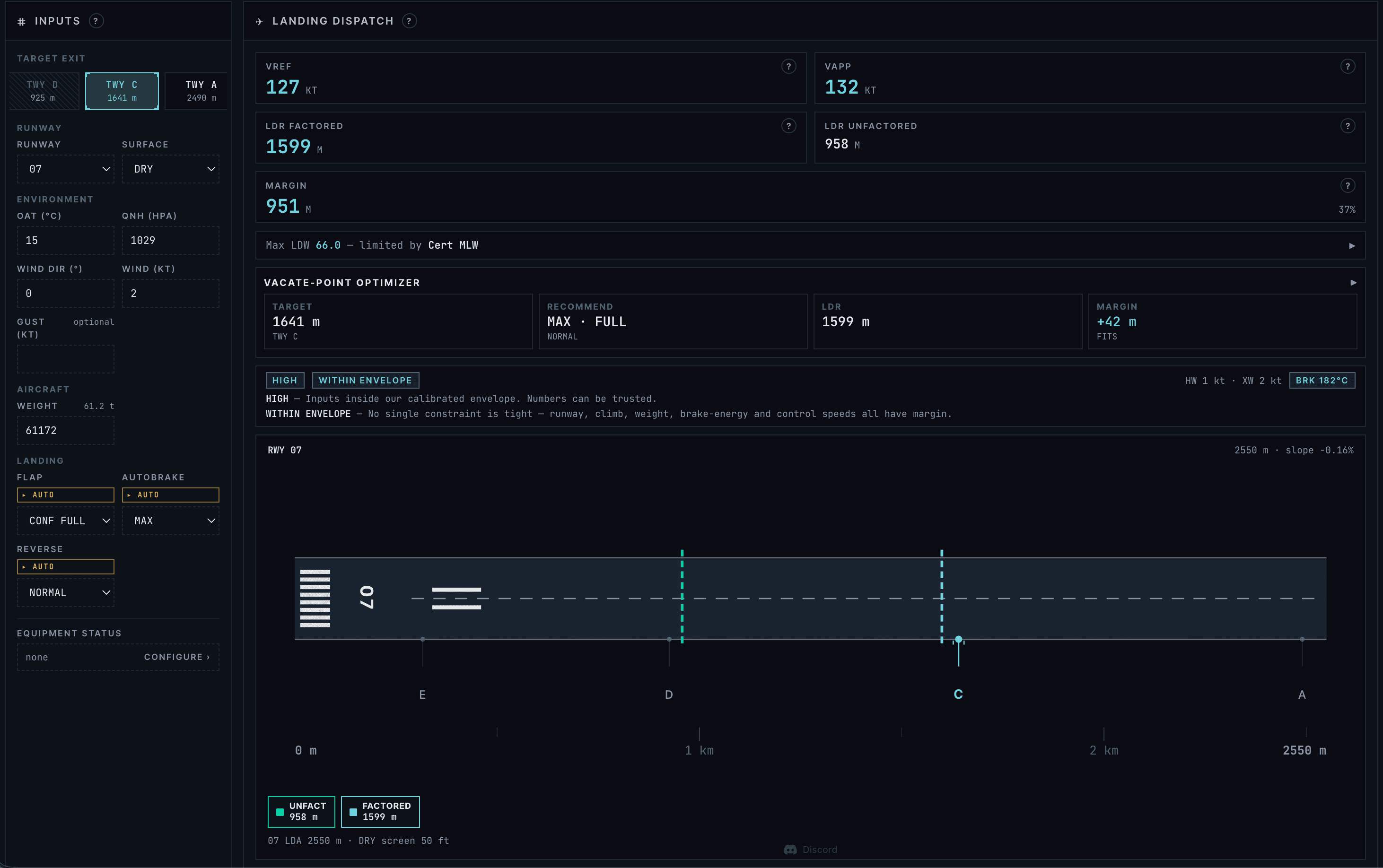
What the prediction is
For each runway at your destination and alternate, SkyNexus shows the runway profile with each named taxiway exit, the distance from the threshold, and a highlighted recommendation: the exit you are most likely to make given your aircraft, your landing weight from the OFP, and the current METAR wind component. It is a glance, not a calculation you have to do.
Underneath it, three deceleration profiles: maximum braking, autobrake-medium-equivalent, and idle reverse only. You see how the recommendation moves between them. If the wind shifts, the recommendation moves with it.
Why predict at all
Two reasons. First, vacating sooner means lower runway occupancy time, which is what real ATC actually optimizes. On VATSIM the controller is watching the same metric, just less formally. Second, picking the right exit lets you brief the taxi route earlier in the approach, when the FMS is doing more of the work, instead of in the flare when you are wind-correcting.
Most sim pilots default to one of two failure modes. Either they roll out to the very end of the runway every time, which is fine for a 2,500 meter runway with a 737 but turns into a thirty second taxi at LFPG. Or they brake too hard and pop a tire because they think they need the first taxiway exit on a runway that has six.
How the math works
The model is deliberately simple. SkyNexus pulls your landing weight from the SimBrief OFP, the destination METAR, and the runway geometry from the airport database. From those it derives an approach speed envelope, an effective threshold crossing speed, and a constant-decel rollout for each braking profile. Touchdown point is set by category (typically 300 to 450 meters past the threshold). The headwind component shortens the rollout, tailwind lengthens it.
Where there is uncertainty, SkyNexus shows a range, not a point. The recommendation is the exit closest to the upper end of the range for the autobrake profile. We are not pretending this is operations-grade landing distance certification. We are pretending you are a real-airline pilot who looks at the chart and goes “A6 looks right, A7 if I carry an extra knot, A5 if the wind drops.”
What it does not do
- It does not compute regulatory landing distance with safety factors. That is the perf calc job, and SkyNexus has a full A320 perf module for that.
- It does not know your specific aircraft braking action degradation. It assumes a dry runway with the friction profile in the airport database.
- It does not replace looking out the window. You always have the final call on which exit you actually take.
Why this exists now
The in-sim EFB does not do this. Navigraph Charts will eventually, their FSWeekend 2026 preview teased extended runway centrelines and approach feathers in a coming release. ForeFlight does parts of it for real-world GA. None of them ship today, and none of them know your SimBrief weight or your live METAR. SkyNexus is opinionated about merging those two together, on the same screen, before you start the approach brief.
Try SkyNexus EFB
Free, browser-based, runs alongside MSFS 2024, X-Plane or P3D. Import your SimBrief OFP and get the full briefing in under a minute.
Get Started Free