VATSIM-native, not VATSIM-feature: how to actually choose a sim EFB
Every sim EFB now says “VATSIM” on the box. Here's the distinction that still tells you something — plus the depth test that separates EFBs once the network coverage is a wash.
There are more sim EFBs than there have ever been. The built-in MSFS 2024 tablet, a wave of external apps, even per-aircraft EFBs baked into payware airliners. Almost all of them now print “VATSIM” on the box. That is good for the hobby and slightly bad for anyone trying to choose, because the word that used to tell you something now tells you almost nothing.
I build SkyNexus, so read this with that bias in mind. But the distinction I want to draw is one you can check yourself in five minutes with any EFB, mine included: is VATSIM a feature bolted on, or is it native to how the tool thinks?
What “VATSIM as a feature” looks like
The bolt-on pattern is easy to spot once you know it. The EFB shows you a list of online controllers. Maybe it filters to the ones near your departure and arrival airports. You get frequencies. It is genuinely useful, and it is also exactly what you could get from any network map in another tab.
- Nearest-airport logic. Coverage is matched to your origin and destination, not to the airspace you actually fly through. The enroute centre that owns 300 miles of your cruise often isn’t in the list.
- One network. VATSIM only. If you fly IVAO too, you are back to a separate tool.
- No position awareness. The EFB shows who is online. It does not know where you are, so it can’t tell you that you’re still on the last sector’s frequency.
What “VATSIM-native” means instead
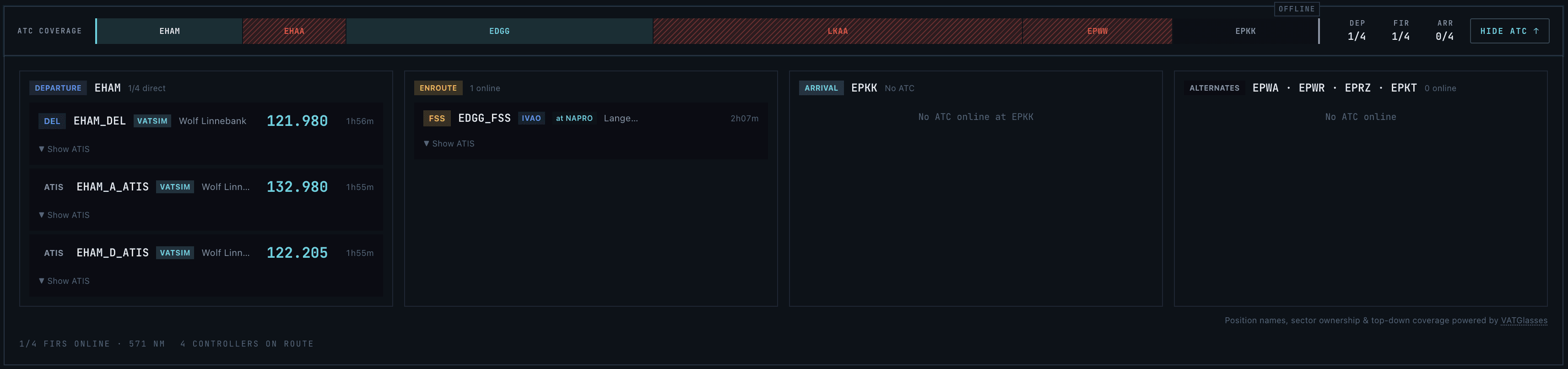
Native means the network is part of the briefing’s model of your flight, not a widget beside it. In SkyNexus that shows up concretely:
- Coverage matched by airspace geometry. Controllers, ATIS and FIR sectors are matched to your actual route by the geometry of the airspace it crosses — departure, enroute, arrival and alternate — with the handoff waypoint for each station, not a nearest-airport approximation.
- Both networks. VATSIM and IVAO, with a per-flight preference, because plenty of pilots live on both.
- It knows where you are. A global alert fires the moment your COM1 is tuned to the wrong station for your position — the single most common avoidable VATSIM mistake.
The test that actually separates EFBs
Here is the uncomfortable part for everyone, including the tools that do VATSIM well: network coverage is the easy half. Once four products do it competently, it stops being a reason to pick one. The real separation is depth — the work that is unglamorous enough that most tools skip it:
- Does it do the dispatch math? Not “V1, VR, V2” from a fixed table — real FCOM-grounded A320 performance with three runway distances, flex, OPTIMUM flap, wet and contaminated models and a CG → trim derivation, with a methodology you can audit. Most EFBs expose two or three numbers and stop.
- Does it tell you which exit you’ll make? A predicted runway-vacate exit from your landing weight, the live wind and the runway geometry, on the briefing tab before you start the approach brief. Almost nothing ships this.
- Does the weather think about your route? Turbulence, icing and jet streams at your flight level, scrubbable to T+36h, with a vertical cross-section along the track — not a raw METAR string.
What SkyNexus deliberately does not do
Native does not mean “does everything.” SkyNexus does not file flight plans to the network and does not push routes into your FMC. That is on purpose: it is a briefing and reference tool, and you file with vPilot, swift or your usual client. An EFB that tries to be your pilot client too tends to do both jobs worse.
If you want the long version — the full side-by-side against the in-sim EFB and the rest of the field, including the rows where SkyNexus says “no” — it’s on the comparison page. The honest rows are the ones worth reading.
Try SkyNexus EFB
Free, browser-based, runs alongside MSFS 2024, X-Plane or P3D. Import your SimBrief OFP and get the full briefing in under a minute.
Get Started Free